
Learn how to leverage CopperPilot’s internet research capabilities to find, compare, and
source electronic components from multiple suppliers. CopperPilot automates the tedious
process of comparing stock levels, pricing, shipping options, and other key factors across
different vendors.
Overview
Sourcing electronic components can be a time-consuming process, especially when dealing
with specialized parts from multiple suppliers. Each platform offers different stock levels,
pricing tiers, and shipping options. Manually comparing all these factors across websites
like Mouser, Digikey, and others is tedious and error-prone. CopperPilot streamlines this
entire process by automating the research and comparison.
The Challenge
When building complex hardware like an NVIDIA Jetson baseboard that requires specialized
connectors (such as custom DDR4 SODIMM connectors), you need to:
- Find the correct part from official documentation
- Identify which suppliers carry the component
- Compare pricing at different volume quantities
- Check stock availability and lead times
- Evaluate shipping options to your location
- Consider additional factors like customer support quality
How CopperPilot Helps
Step 1: Reference the Component
Start by referencing the specific component in your design using the ‘@’ operator.
For example, if you’re working with connector J15, simply type @J15 in
the chat.
Step 2: Request Component Research
Instruct CopperPilot to research sourcing options. You can specify:
- What component to search for
- Which official documentation to reference (e.g., NVIDIA documentation)
- Comparison criteria (pricing, shipping to specific regions, lead times)
- Volume quantities you’re interested in
Step 3: CopperPilot Conducts Research
Once you submit your request, CopperPilot:
- Accesses official documentation to identify the correct part
- Scans the internet to find suppliers
- Visits relevant supplier websites (Mouser, Digikey, etc.)
- Extracts pricing, stock, and shipping information
- Compiles all data into a comprehensive comparison
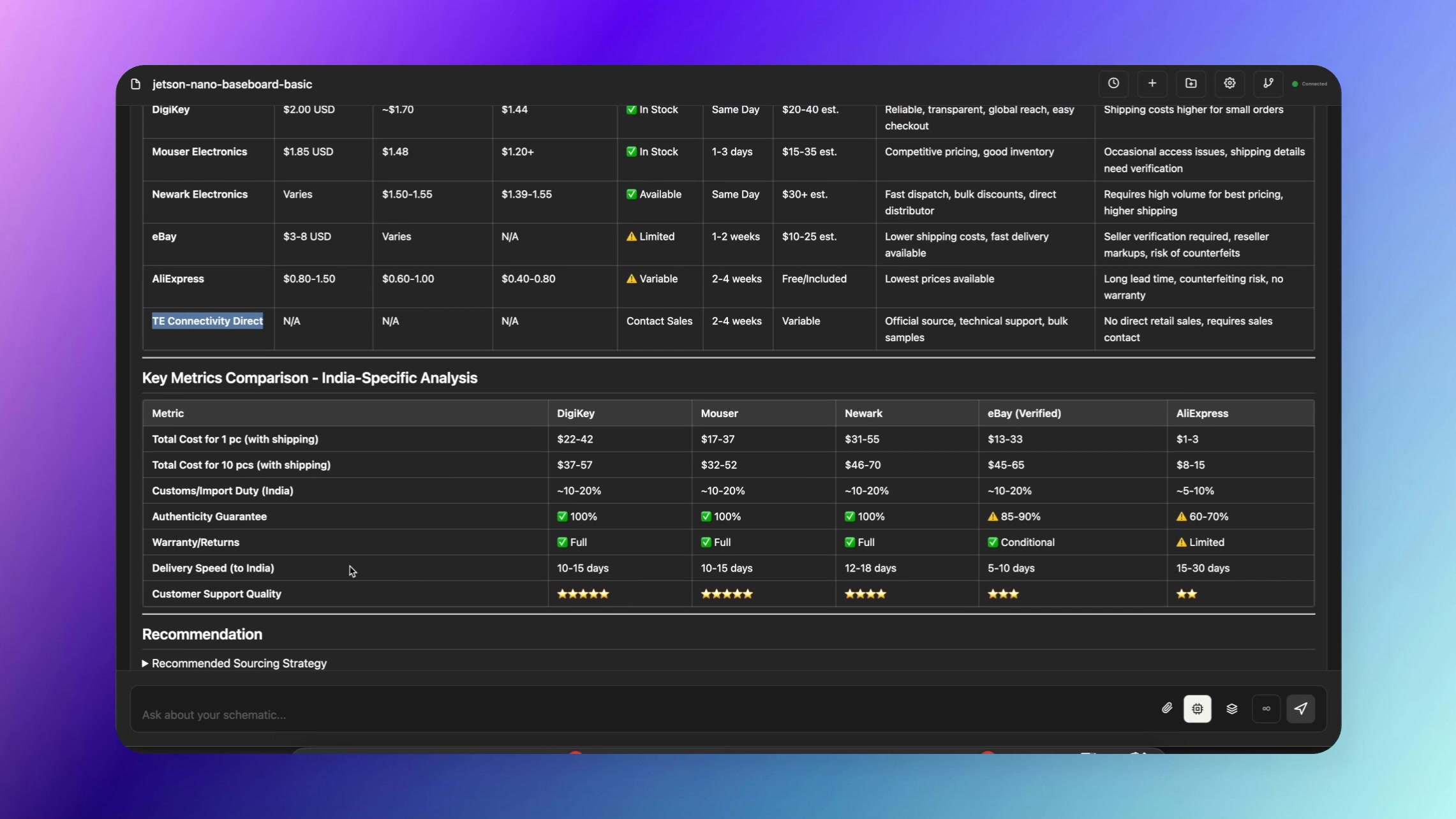
Step 4: Review the Comparison Table
CopperPilot presents you with a detailed table that includes:
- Supplier List: All websites where the component is available
- Pricing Details: Cost breakdowns at different volume quantities
- Lead Times: Expected delivery timeframes for each supplier
- Stock Availability: Current inventory levels
- Shipping Options: Delivery options to your specified location
- Additional Metrics: CopperPilot may suggest other factors like
customer support quality, return policies, or minimum order quantities
Step 5: Access Citations and Sources
CopperPilot provides citations for all its findings, allowing you to:
- Verify the information independently
- Access direct links to supplier pages
- Review official documentation references
- Ensure data accuracy and reliability
Example Use Case
Scenario: You’re building an NVIDIA Jetson baseboard and need to source
a custom DDR4 SODIMM connector (J15).
CopperPilot Command: “Examine @J15, access the official NVIDIA documentation
to identify sources for this connector, and compare options based on pricing, shipping to
India, lead times, and stock availability.”
Result: CopperPilot delivers a comprehensive comparison table showing
multiple suppliers with detailed metrics, helping you make an informed purchasing decision
in minutes rather than hours.
Key Benefits
- Time Savings: Automate hours of manual research into minutes
- Comprehensive Coverage: CopperPilot checks multiple suppliers simultaneously
- Accurate Comparisons: Get standardized metrics across all suppliers
- Global Shipping: Compare shipping options to your specific location
- Volume Pricing: See cost breakdowns for different order quantities
- Verified Sources: Citations ensure you can verify all information
- Smart Suggestions: CopperPilot may recommend additional comparison
criteria you hadn’t considered
Tips for Best Results
- Be specific about your location for accurate shipping comparisons
- Specify the volume quantities you’re interested in
- Mention any specific suppliers you prefer or want to avoid
- Ask CopperPilot to prioritize certain factors (e.g., lead time over price)
- Request additional metrics if the initial comparison doesn’t cover all your needs
With CopperPilot’s component sourcing capabilities, you can make better-informed purchasing
decisions quickly and efficiently, ensuring you get the right parts at the right price with
the best delivery options for your project needs.