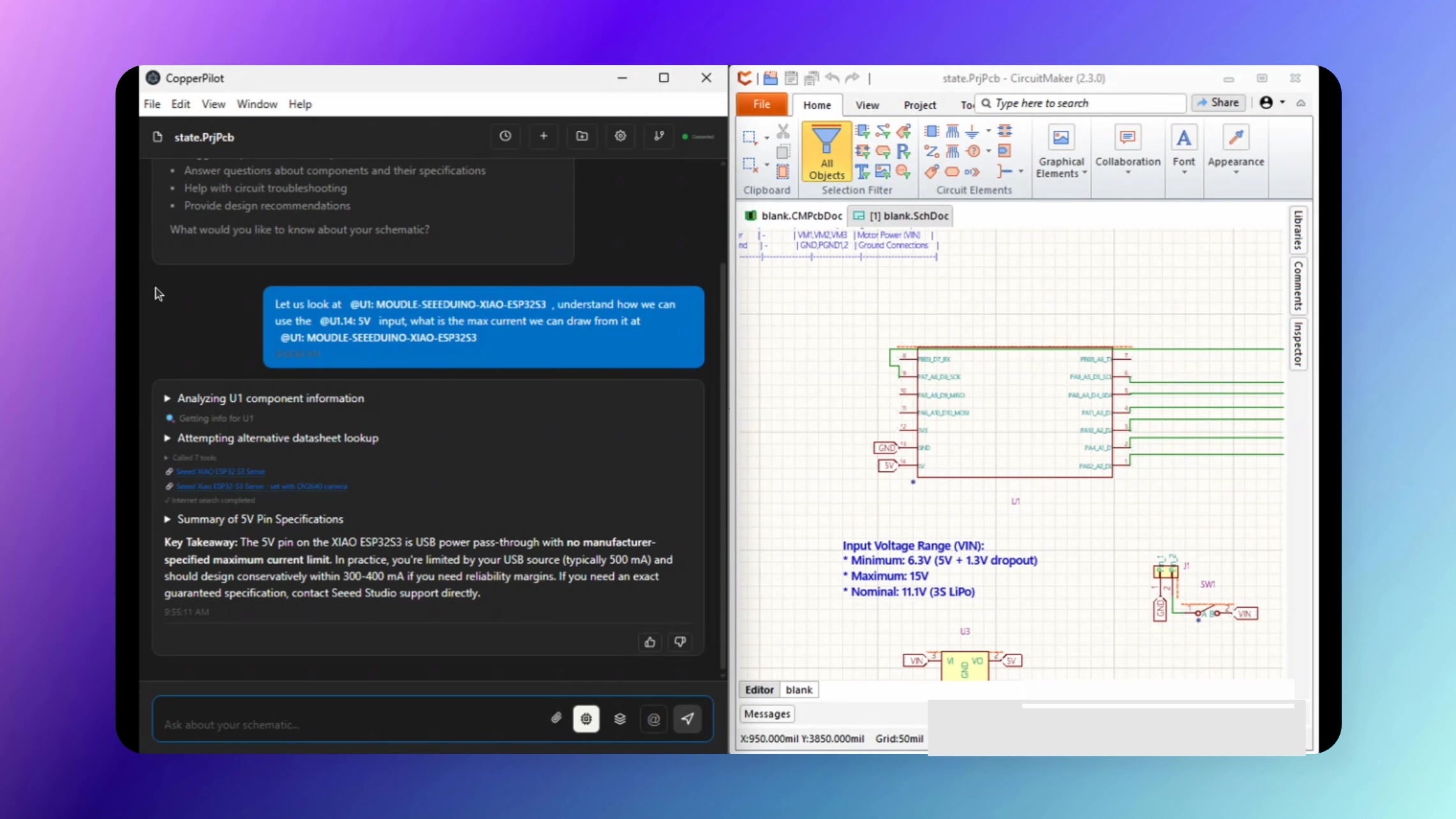
CopperPilot accommodates multiple design file input sources, including Altium Designer
and Altium CircuitMaker. This demo showcases CopperPilot analyzing an ESP32 project
created in Altium CircuitMaker.
What This Demo Shows
In this example, CopperPilot works with an ESP32 project from Altium CircuitMaker to demonstrate:
-
Component Identification: CopperPilot successfully tags and identifies
components like the ESP32 (U1) from your Altium design files -
Pin Analysis: Query specific pins (such as pin 14, the 5V input) and
get detailed electrical specifications -
Design Context Analysis: CopperPilot examines the Altium project
context to provide accurate, design-specific answers—like confirming the maximum
current draw capabilities
Key Takeaways
- CopperPilot supports both Altium Designer and Altium CircuitMaker projects
- Component tagging and identification works seamlessly with Altium design files
- You can query pin specifications and electrical characteristics directly from your design
- CopperPilot retrieves relevant data and extracts valuable information from your Altium projects